14aug- 19 aug
AJAX stands for Asynchronous JavaScript and XML. AJAX is a new technique for creating better, faster, and more interactive web applications with the help of XML, HTML, CSS, and Java Script.
- Ajax uses XHTML for content, CSS for presentation, along with Document Object Model and JavaScript for dynamic content display.
- Conventional web applications transmit information to and from the sever using synchronous requests. It means you fill out a form, hit submit, and get directed to a new page with new information from the server.
- With AJAX, when you hit submit, JavaScript will make a request to the server, interpret the results, and update the current screen. In the purest sense, the user would never know that anything was even transmitted to the server.
- XML is commonly used as the format for receiving server data, although any format, including plain text, can be used.
- AJAX is a web browser technology independent of web server software.
- A user can continue to use the application while the client program requests information from the server in the background.
- Intuitive and natural user interaction. Clicking is not required, mouse movement is a sufficient event trigger.
- Data-driven as opposed to page-driven.
AJAX cannot work independently. It is used in combination with other technologies to create interactive webpages.
JavaScript
- Loosely typed scripting language.
- JavaScript function is called when an event occurs in a page.
- Glue for the whole AJAX operation.
DOM
- API for accessing and manipulating structured documents.
- Represents the structure of XML and HTML documents.
CSS
- Allows for a clear separation of the presentation style from the content and may be changed programmatically by JavaScript
XMLHttpRequest
- JavaScript object that performs asynchronous interaction with the server.
Understanding XMLHttpRequest
An object of XMLHttpRequest is used for asynchronous communication between client and server.
It performs following operations:
- Sends data from the client in the background
- Receives the data from the server
- Updates the webpage without reloading it
How AJAX works?
AJAX communicates with the server using XMLHttpRequest object. Let’s try to understand the flow of ajax or how ajax works by the image displayed below.
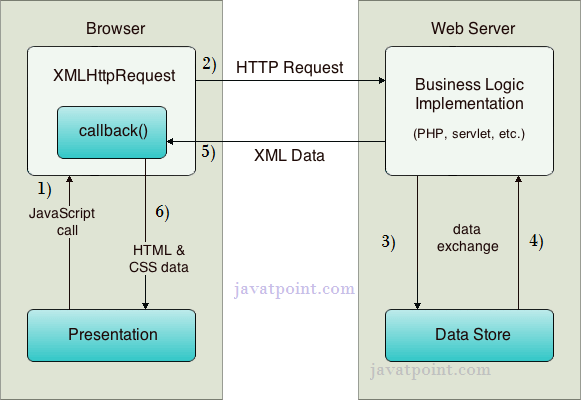
As you can see in the above example, XMLHttpRequest object plays a important role.
- User sends a request from the UI and a javascript call goes to XMLHttpRequest object.
- HTTP Request is sent to the server by XMLHttpRequest object.
- Server interacts with the database using JSP, PHP, Servlet, ASP.net etc.
- Data is retrieved.
- Server sends XML data or JSON data to the XMLHttpRequest callback function.
- HTML and CSS data is displayed on the browser.
Ajax Java Example
To create ajax example, you need to use any server-side language e.g. servlet, jsp, php, asp.net etc. Here we are using JSP for generating the server-side code.
In this example, we are simply printing the table of the given number.
Steps to create ajax example with jsp
You need to follow following steps:
- load the org.json.jar file
- create input page to receive any text or number
- create server side page to process the request
- provide entry in web.xml file
create input page to receive any text or number
In this page, we have created a form that gets input from the user. When user clicks on the showTable button, sendInfo()function is called. We have written all the ajax code inside this function.
We have called the getInfo() function whenever ready state changes. It writes the returned data in the web page dynamically by the help of innerHTML property.
table1.html
<html>
<head>
<script>
var request;
function sendInfo()
{
var v=document.vinform.t1.value;
var url=“index.jsp?val=”+v;
if(window.XMLHttpRequest){
request=new XMLHttpRequest();
}
else if(window.ActiveXObject){
request=new ActiveXObject(“Microsoft.XMLHTTP”);
}
try
{
request.onreadystatechange=getInfo;
request.open(“GET”,url,true);
request.send();
}
catch(e)
{
alert(“Unable to connect to server”);
}
}
function getInfo(){
if(request.readyState==4){
var val=request.responseText;
document.getElementById(‘amit’).innerHTML=val;
}
}
</script>
</head>
<body>
<marquee><h1>This is an example of ajax</h1></marquee>
<form name=“vinform”>
<input type=“text” name=“t1”>
<input type=“button” value=“ShowTable” onClick=“sendInfo()”>
</form>
<span id=“amit”> </span>
</body>
</html>
create server side page to process the request
In this jsp page, we printing the table of given number.
index.jsp
<%
int n=Integer.parseInt(request.getParameter(“val”));
for(int i=1;i<=10;i++)
out.print(i*n+”<br>“);
%>
web.xml
<?xml version=“1.0” encoding=“UTF-8”?>
<web-app version=“2.5” xmlns=“http://java.sun.com/xml/ns/javaee”
xmlns:xsi=“http://www.w3.org/2001/XMLSchema-instance”
xsi:schemaLocation=”http://java.sun.com/xml/ns/javaee
http://java.sun.com/xml/ns/javaee/web-app_2_5.xsd”>
<session-config>
<session-timeout>
30
</session-timeout>
</session-config>
<welcome-file-list>
<welcome-file>table1.html</welcome-file>
</welcome-file-list>
</web-app>
Output:-

Ajax Java Example with Database
In this example, we are interacting with the database. You don’t have to make any extra effort. Only write the database logic in you server side page.
In this example, we have written the server side code inside the index.jsp file.
Steps to create ajax example with database through jsp
You need to follow following steps:
- load the org.json.jar file
- create input page to receive any text or number
- create server side page to process the request
create input page to receive any text or number
In this page, we have created a form that gets input from the user. When user press any key sendInfo() function is called. We have written all the ajax code inside this function.
We have called the getInfo() function whenever ready state changes. It writes the returned data in the web page dynamically by the help of innerHTML property.
table1.html
<html>
<head>
<script>
var request;
function sendInfo()
{
var v=document.vinform.t1.value;
var url=“index.jsp?val=”+v;
if(window.XMLHttpRequest){
request=new XMLHttpRequest();
}
else if(window.ActiveXObject){
request=new ActiveXObject(“Microsoft.XMLHTTP”);
}
try{
request.onreadystatechange=getInfo;
request.open(“GET”,url,true);
request.send();
}catch(e){alert(“Unable to connect to server”);}
}
function getInfo(){
if(request.readyState==4){
var val=request.responseText;
document.getElementById(‘amit’).innerHTML=val;
}
}
</script>
</head>
<body>
<marquee><h1>This is an example of ajax</h1></marquee>
<form name=“vinform”>
Enter id:<input type=“text” name=“t1” onkeyup=“sendInfo()”>
</form>
<span id=“amit”> </span>
</body>
</html>
create server side page to process the request
In this jsp page, we printing the id and name of the employee for the given id.
index.jsp
<%@ page import=“java.sql.*”%>
<%
String s=request.getParameter(“val”);
if(s==null || s.trim().equals(“”)){
out.print(“Please enter id”);
}else{
int id=Integer.parseInt(s);
out.print(id);
try{
Class.forName(“com.mysql.jdbc.Driver”);
Connection con=DriverManager.getConnection(“jdbc:mysql://localhost:3306/mdb”,”root”,”root”);
PreparedStatement ps=con.prepareStatement(“select * from emp where id=?”);
ps.setInt(1,id);
ResultSet rs=ps.executeQuery();
while(rs.next()){
out.print(rs.getInt(1)+” “+rs.getString(2));
}
con.close();
}catch(Exception e){e.printStackTrace();}
}
%>
Output:-


Java AJAX Email Finder Example
We can create an AJAX example in Java which checks whether the given email id exists in the database or not.
Steps to create email finder example using AJAX in Java
You need to follow following steps:
- Create table in database
- load the org.json.jar file
- Create input form
- Create server side page to search employee using name
Create table in database
In this example, we are using oracle 10g database. Here, we have created a table “user100” which has following data.

Create input form
In this page, we have created a form that gets input from the user to find email. When you click on the check availability button, it tells whether email id is available or not.
index.html
<!DOCTYPE html>
<html>
<head>
<title>Email Finder Example</title>
<script>
var request;
function sendInfo(){
var email=document.vinform.email.value;
var url=“emailfinder.jsp?email=”+email;
if(window.XMLHttpRequest){
request=new XMLHttpRequest();
}
else if(window.ActiveXObject){
request=new ActiveXObject(“Microsoft.XMLHTTP”);
}
try{
request.onreadystatechange=getInfo;
request.open(“GET”,url,true);
request.send();
}catch(e){alert(“Unable to connect to server”);}
}
function getInfo(){
if(request.readyState==4){
var val=request.responseText;
document.getElementById(‘mylocation’).innerHTML=val;
}
}
</script>
</head>
<body>
<marquee><h1>AJAX Email Checker Example</h1></marquee>
<form name=“vinform”>
<input type=“email” name=“email” placeholder=“enter email”/>
<input type=“button” onclick=“sendInfo()” value=“Check Availability”/>
<span id=“mylocation”></span>
</form>
</body></html>
Create server side page to process the request
In this jsp page, we are writing the database code to search email id.
emailfinder.jsp
<%@ page import=“java.sql.*” %>
<%
String email=request.getParameter(“email”);
if(email.contains(“@”)&&email.contains(“.”)){
try{
Class.forName(“oracle.jdbc.driver.OracleDriver”);
Connection con=DriverManager.getConnection(“jdbc:oracle:thin:@localhost:1521:xe”,”system”,”oracle”);
PreparedStatement ps=con.prepareStatement(“select * from user100 where email=?”);
ps.setString(1,email);
ResultSet rs=ps.executeQuery();
if(rs.next()){
out.print(“Unavailable! <img src=‘unchecked.gif’/>“);
}else{
out.print(“Available! <img src=‘checked.gif’/>“);
}
}catch(Exception e){out.print(e);}
}else{
out.print(“Invalid email!”);
}
%>
Output:-


 ADVANCE JAVA